


01 — The tool
Free Camelot wheel for harmonic mixing and DJ keys
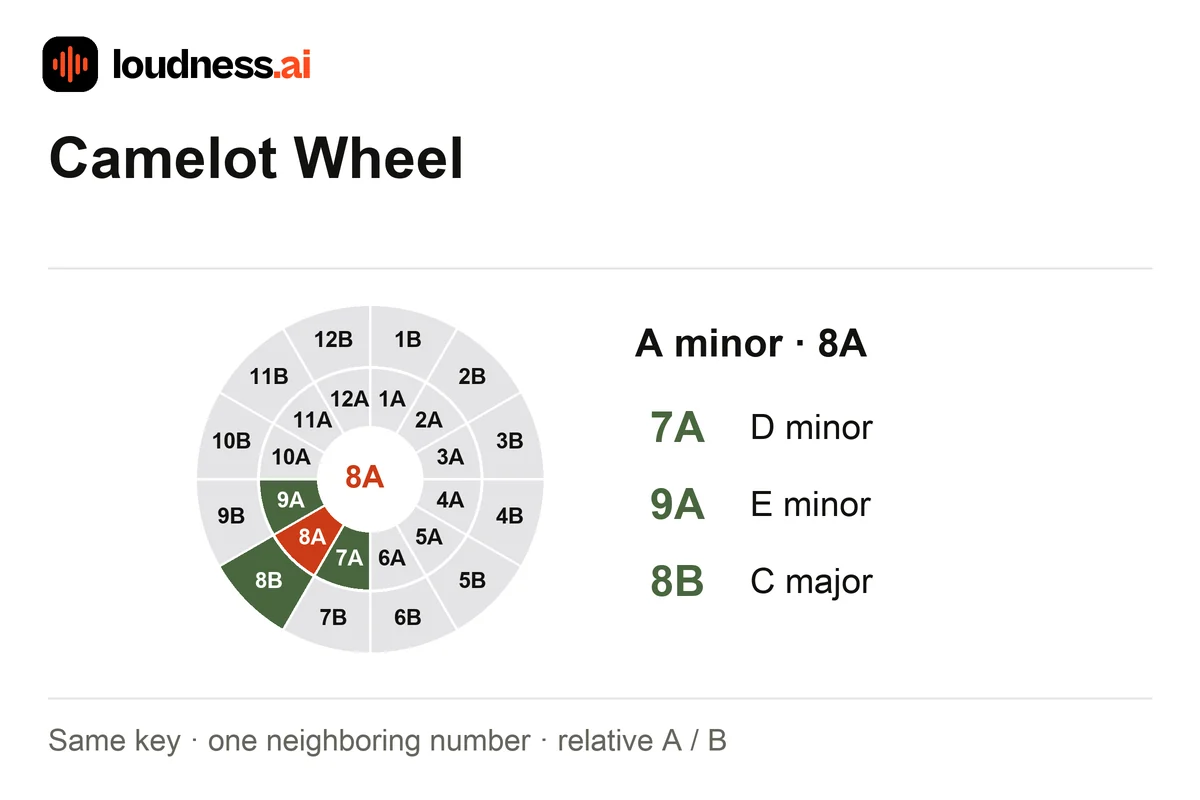
Use the free interactive Camelot wheel as a harmonic mixing reference for 24 major and minor keys. Select a segment or choose a key to see its name, neighbors and relative major or minor. Use the second key selector to compare another track and read how the two keys relate.
Camelot A codes are minor keys and B codes are major. Basic harmonic matches keep the same code, move one number around the same ring, or switch A and B at the same number. For example, 8A is A minor: try 7A, 9A or 8B. Use Song Key Finder if you first need to estimate a recording’s key.
02 — How it works
How to use the Camelot wheel for DJ mixing
Select your current track’s key
Choose a musical key or click its wheel segment. The tool shows the name and Camelot code together, making it easier to compare a library labeled with note names to one labeled with numbers.
Review neighboring and relative keys
Keep the same letter and move one number forward or back, with 12 wrapping to 1. Alternatively, switch A and B without changing the number. Select a match to continue exploring your next transition.
Compare another known key and listen
Choose the second track’s key to read its relationship to the current selection. Check a short overlap in your DJ software, then use BPM Finder to compare tempo as a separate part of the transition.
03 — Practical uses
Camelot key matching for playlists and transitions
Plan a sequence of compatible tracks
Move through neighboring keys while arranging a DJ playlist. Keep notes on tracks that blend well in practice: vocals, prominent bass lines and chord voicings can still compete during a long overlap.
Translate key names into Camelot codes
Convert a known musical key into the code used in your track library. C major is 8B and A minor is 8A. Both share notes, while their tonal centers give the music a different resting point.
Choose the length of a transition
Use key relationships alongside phrasing and energy. If two tracks sit outside the basic matches, try a shorter or percussion-led transition. Audio Cutter helps prepare a passage for practicing the overlap.
04 — Frequently asked questions
Camelot wheel and harmonic mixing questions
Is the Camelot wheel free?
Yes. Explore all 24 keys, select compatible neighbors and compare two known keys online for free. The wheel works without uploading audio and does not change the pitch or tempo of a recording.
What is the difference between A and B?
A marks minor keys; B marks major keys. Keys with the same number and opposite letters are relative major and minor. Keys one number apart on the same ring are basic neighboring matches.
Can I move from 12A to 1A?
Yes. The numbered ring wraps around, so 12A and 1A are neighbors. The same applies to 12B and 1B. Listen to both tracks together before using a long harmonic blend.
Does a compatible Camelot code guarantee a good mix?
No. The wheel describes key relationships, while a transition also depends on tempo, phrasing, arrangement and the notes playing during the overlap. Test the actual passages; a short mix may work where a sustained blend clashes.